
Key Highlights
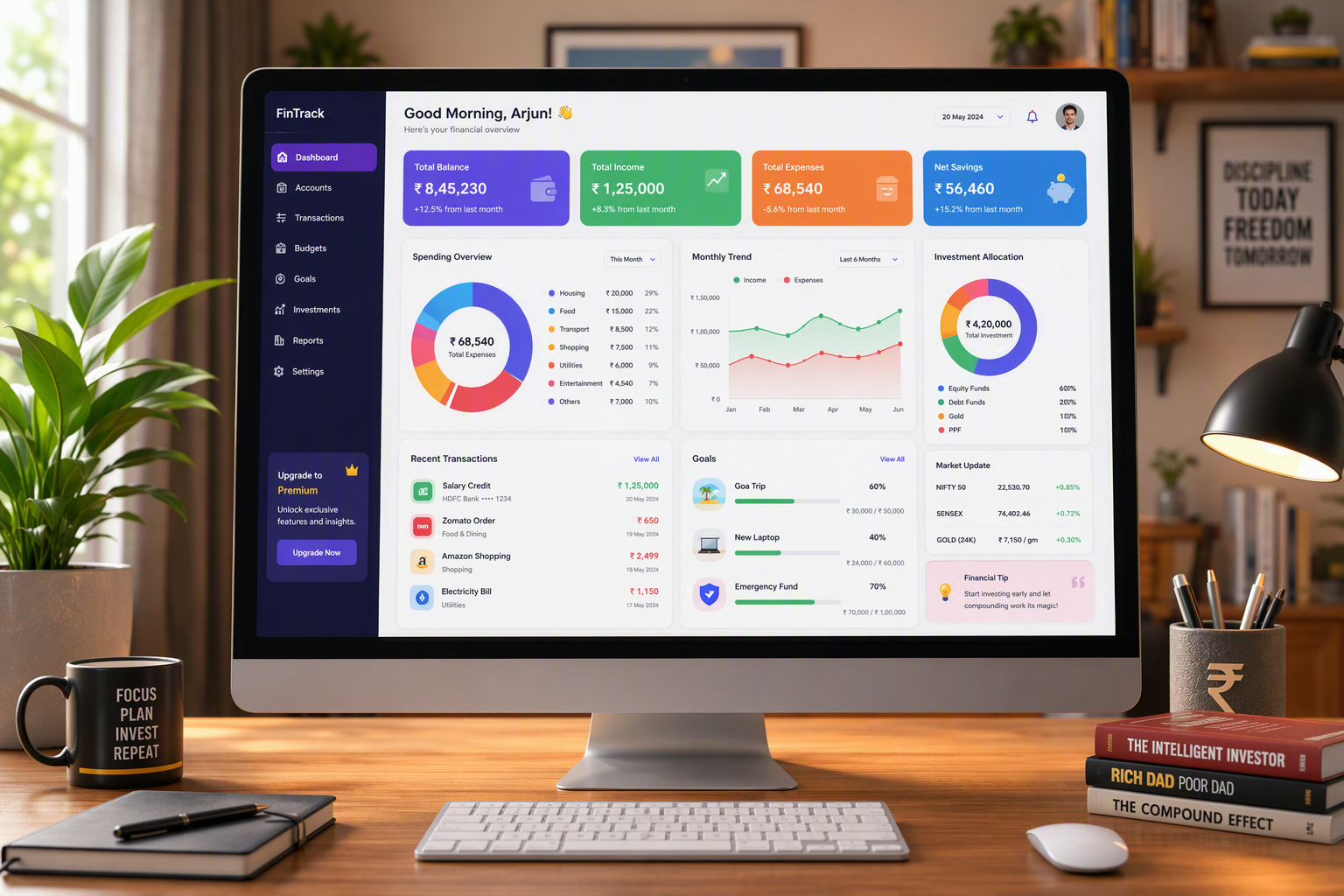
- A personal finance dashboard lets you see all your cash flow, spending, and savings in one place.
- It helps you make quick choices by showing you your expense tracking, where your budget is short, and how close you are to your financial goals.
- A good finance dashboard design uses simple data visualization. It stays clear and not crowded, so you get better support for your choices.
- You can use different ways to set up your dashboard. You might pick apps, spreadsheets, or something custom, based on what you feel best with and what you need.
- Indian users get more from rupee-based categories, the choice to share their budget, and alerts that you can change.
- Your bank accounts and credit card data can be added for useful, real-time updates and check-ins.
Introduction
You may already use different finance tools. These can be your checking app, credit card app, notes app, and broker website. Each one shows only its own part of your money life. The trouble is, you still need to put the whole story together by yourself. A personal finance dashboard can help. It brings all your main information into one place. With this, you get a clear picture of your cash flow. It helps you see problems sooner and feel more sure when you make choices about your money.
Understanding Personal Finance Dashboards
A finance dashboard is not just a ledger or a list of transactions. You can think of it as a decision screen for your money. A finance dashboard puts all your important financial data in one place. This helps you see your current position fast and clearly.
Good dashboard design makes the user experience better. A good setup shows what matters most to you. It helps you see change over time. It also lets you look closer at details when you need to. The next sections talk about why dashboards are important, which features you should look at, and how different people can make one that works for real life.
What Makes a Dashboard Essential for Budgeting
A financial dashboard is important because budgeting is much more than keeping records. You need a spot where your money plan and your daily money habits come together. If your income, bills, savings, and spending are in different apps or tools, you lose track and spend more time. A financial dashboard gives you one clear place to check before you buy something or see if you are off your money goals.
For a core spending plan to work, you need to have clear categories and controls. A budgeting app should not hide how things work, call purchases by the wrong name, or make it hard to fix mistakes. If it does, you will not get good numbers. Good dashboard design should keep everything easy to see. It helps you review your spending fast and take action when you need to.
A good personal finance dashboard should help you track your money in a simple way. Start by showing your income. It should put your spending into groups or categories. Make sure there is a part where you can see how your savings is doing. Add a place to compare what you set as your budget and what you really spent. You also need a list of your payments and how much they were. These things are important for a finance dashboard. All of this helps you get closer to your financial goals. It can also make it more likely for you to have good results with your money.
Key Functions of Personal Finance Dashboards
Most popular dashboards do a good job because they use a short list of signals. They do not show you lots of widgets that you do not need. The main idea is to keep the dashboard current so it helps during both normal months and messy ones. When the main screen shows the right key performance indicators, it makes your financial performance easy to read and act on.
Common functions include:
- Track your net worth, so you can see both what you have and what you owe in one place.
- Watch your monthly cash flow, so you know if your money in will cover what goes out.
- See spending by category, so you can spot habits and leaks.
- Check budget against your real numbers, so you can compare your plan with what is really happening.
These features help you get useful tips that you can use right away. You can see changes early in your financial life. This lets you fix category mistakes, stop spending when needed, or move your money before any small problem gets worse. That is why a dashboard is very helpful in day-to-day financial life.
Core Features Every Dashboard Should Include
The best dashboards need a few key things. You should have summary numbers, views that show trends over time, and some deeper detail below. This simple setup turns dashboard design into something that is useful, not just pretty. If you do not include these basics, the dashboard may look good but still not help when you need to make a quick choice.
Clear data visualization comes next. Each chart needs to answer a clear question. For example, you may want to know where money went or if the month was tight. A strong decision layer helps you move from seeing a problem to fixing it fast. This is just what the next features help with.
Expense Tracking and Visualization
Expense tracking is the base of any good dashboard. If you do not know where your money goes, it’s just a guess. Strong data visualization helps change your raw spending data into clear patterns. This lets you spot spending habits before they hurt your budget. It also helps you keep track of personal spending so it does not get mixed up with all the other charges.
Useful visual tools include:
- A bar chart for spending by category helps you see big costs right away.
- A donut chart for overall category share lets you see where most money goes.
- A searchable transaction table lets you check the details behind every total.
Setup is important too. Use categories that fit your real life, not what you wish it was. Make sure you split fixed expenses, flexible essentials, and personal spending in the correct way. When these categories are clear, it gets easier to keep track of your expenses. You can also trust your numbers more.
Saving Progress and Goal Management
It is easier to keep up with saving progress when you can see it as a main part of your plan on the dashboard, not as something extra. A good setup will put savings in its own spot near the top of your screen. If you have income that changes from month to month, buffer logic can help a lot. This is because buffer logic shows you what money is safe to use and what money you need to keep for taxes, emergencies, or times when you make less.
Goal management works best when each budget goal has a clear reason. You may use it to track emergency savings, paying off debt, travel, or a big buy you want in the future. You do not need to make lots of goals. The real aim is to keep your budget goals easy to see. This way, you can look at them during your regular weekly and monthly check-ins.
You can make a dashboard for your budget goals that works for you. You can add things like progress markers, set-aside buckets, and easy-to-see trend lines. When you see the progress that you have saved, it feels real. This helps you stay motivated and holds back last-minute spending.
Monitoring Investments and Debt
A good dashboard is not just about bills or grocery spending. It needs to include ideas like debt and investment too. These things help you see how your financial situation looks over time. Credit balances, loans, and investment accounts are important. They show how much you really get ahead.
When you track your wealth, make sure you check your investment portfolio value first. Put it at the top with cash flow and how much you spend in each category. Some people also look at real estate and bitcoin value. This can help you know where you stand. But do not let those things change how you spend money each day. The value of speculative assets should stay out of your main spending plan. Keep them separate from your everyday budget.
The main thing to look at is your total net worth. This means taking all you own and taking away all you owe. You do not need to check it each day. But you should check which way it is going over time. That helps you see your accounts as one clear story about your money.
Choosing the Best Tools for Your Finance Dashboard
There is not one tool that is the best for every person. The right choice depends on what you need it to do, how much you want to set up, and how important privacy is for you. It also matters if you want more work done by the tool automatically or if you want more control. Some people do well with a spreadsheet. Others would rather use apps that make things easier and keep the dashboard current without much work.
When you look at finance tools, try to pick the one that works best for you instead of just looking at nice charts. A good dashboard design should let you change things how you like. It should be easy to look at and the automation should be clear to understand. It is also good if the tool brings data from your bank accounts, cards, and other sources all into one place. These points make a big difference to what you pick.
Popular Personal Finance Apps in India
If you do not want to do a lot of work by hand, the easiest place to start is with finance apps. These apps help you see cash flow, check different types of spending, and plan a budget all in one place. The best options are the ones that make it easy to use the app and check your money. But they should not hide how your spending is sorted or shown. This is true whether you use a checking app every day, or you wait to look at a credit card app when your bill is ready.
| Tool Type | Strength for Dashboard Use | Best For |
|---|---|---|
| Budgeting app | Built for planning, category review, and ongoing spending decisions | Users who want active budgeting |
| Checking app | Fast balance checks and recent transactions | Quick cash flow checks |
| Credit card app | Credit spending review and payment status | Debt and card monitoring |
| Custom connected app | Broad data access across accounts | Users who want one-screen visibility |
Giving more people access to data helps, but it works best when rules are easy to see and understand. The top apps or tools for a personal finance dashboard are the ones you still use even if you have a hard month. People get more from trust and good reviews than from a tool’s look.
Spreadsheet Solutions: Excel, Google Sheets
Spreadsheet solutions are good if you want to have full control. Excel and Google Sheets help you set your own categories and use any formulas you need. You can also pick how to review things and how everything looks. This works well when your money matters are simple. It is also a good way to learn what you want on your dashboard before you start using an app.
Here is the trade-off:
- Manual upkeep lets you have privacy and makes things flexible, but doing updates can be tiring after some time.
- Custom logic helps you build what you want, but errors in formulas can mess up the results.
- Deeper transaction detail is easy to keep, but when many people edit together, things can get messy.
If you want to make a personal finance dashboard, begin with a simple overview-trend-detail plan. Start by using summary cards to show your main numbers. Add charts to show how your finances change each month. Put a transaction sheet under that. A clear starting point like this helps make later changes easy.
Digital Platforms like Notion and Microsoft Fabric
Digital tools are good for people who want more than a simple sheet and still have the power to change the system. Notion can be used for setting goals, keeping categories, doing reviews, and working with financial data in one spot. Microsoft Fabric is best for technical users who need stronger tools for pipelines, set times to refresh info, and a custom stack that does more.
If you want to make a personal finance dashboard in Notion, start simple. Make linked databases for your accounts, your money moves, your goals, and how you review things. After that, add clear views that show your monthly cash flow, quick category summaries, and your next steps. The power in this way is how it helps you stay well-organized and gives you many ways to work with your money.
To set up a personal finance dashboard in Microsoft Fabric, you should keep the main steps apart. First, bring in data from different sources. Next, clean up the labels and use your own custom logic where needed. After that, build data visualization on top. This way, technical users can make sure the automation can be checked later. The finance dashboard will be good for people to use and easy to read.
Customizing Your Dashboard for Indian Budgeting Needs
A dashboard is useful only if it shows the real way you spend your money. In India, you should set up your dashboard to fit your habits, the way you pay, and your family setup. The normal categories might be confusing. This is true when things like your daily spending, family bills, and earnings that change from month to month all come together.
Clear controls are as important as local labels. You have to capture your specific needs in a way that is simple to read every month. You can set up rupee-based groups, shared planning, and reminders. In the next sections, you will see how to make a dashboard feel more useful and not feel forced.
Including Rupee-Based Categories
Rupee categories help make your dashboard easy to read. They also help you make better choices every day. If your dashboard has labels or amounts that do not match how you see your money, it will be harder for you to keep track of things. The correct way is to build your categories on how you really spend, not just use what the app gives by default.
A common setup for a budget starts with things you need, debt payments, savings, and discretionary spending. Then, you can add household needs, shared goals, and personal buckets. The correct categories are the ones you can use every time. If a label feels too broad, it will likely bring errors during a budget review.
A common problem can happen if you add too many small categories fast. This makes things messy and people may not trust it. To reach your budget goals, use simple categories. Make them based on rupees and keep them clear. It also helps to split fixed costs from flexible spending.
Setting Up Household and Shared Budgets
Household budgets are more than just about both people having access. They also need both people to agree on what the numbers mean. A common failure mode is when couples look at the same numbers but do not read them in the same way. This can turn the budget dashboard into something stressful instead of something clear. A shared budget works well when both people talk about who does what, what each category means, and how often they will look at the budget together. It helps to decide these things from the start.
Important steps include:
- Make shared household categories for things everyone needs and for any goals you have together.
- Set up different buckets for discretionary spending for each person.
- Add a regular budget review part that shows what changed since the last time you looked.
Useful tools help keep edit conflicts low and make it easy to control categories. It does not matter if you pick an app or a spreadsheet. The dashboard must let people talk and share, not feel like they are watched. When it comes to families, clear steps usually work better than lots of small details.
Tailoring Spending Alerts and Financial Reminders
Spending alerts and the financial reminders let you act before any problems get bigger. These can be good when cash flow is tight, when your income is not the same every month, or when you share money choices with other people. You do not have to wait for a bad surprise. Instead, you get a notice while you still have time to make changes.
Helpful options include:
- The app sends alerts if your discretionary spending goes over a set limit.
- You get reminders for things like bills you pay often, reviews you do each month, or when you need to move money to savings.
- The app gives you notifications if there are any transactions that look strange and might need to be checked.
These reminders help to calm uncertainty in your financial life. They do this by making it easier for you to not have to remember every due date. You also do not have to wonder if a category is going off track. A good dashboard will have alerts you can see, understand, and change when things in your life change.
Building a Personal Finance Dashboard: Step-by-Step
The build process is much easier when you keep it small. It helps to start with a clear starting point. For example, look at your monthly cash flow, check your category spending, and compare your budget to what you actually spend. This will give you a very practical first version you can use, instead of making a system that is too complicated and will not get finished. A simple setup is easy to trust and also very simple to keep up with over time.
First, get the basics working right. After that, you can add custom logic, like savings goals and tracking debt. Add things like automation only when the numbers are easy to read and every part matches your transactions. This step-by-step way helps turn a rough dashboard into a tool you can trust, not just a one-time project.
Selecting Your Template or Starting from Scratch
A dashboard template can be a good way to start your work. The template gives you the structure you need. You can find summary cards, different category views, and detail for every transaction. You do not have to make all of these from the start on your own. For anyone still learning what numbers are important in their financial situation, this is a good reason to use a template.
You might start from scratch when:
- You need custom logic that basic templates do not handle.
- You want special categories for irregular income or for shared budgeting.
- You care more about flexibility than setting things up fast.
The best choice comes down to how clear your needs are. If you are not sure yet, pick a template that has an overview, trend, and detail sections. This gives you a clear starting point. After that, change it little by little as your habits and goals start to make more sense.
Integrating Data Sources Automatically
Yes, you can set up your personal finance dashboard to add data for you. This lets the dashboard pull in info from your bank accounts, credit cards, and brokerage data without you having to type out each number. With this, you spend less time on your personal finance work. Your finance dashboard shows up-to-date data all the time, so you see what is happening with your finances without much effort.
Automatic data input makes things easier because financial data often comes from different sources. When these streams connect in the right way, you get a better view of all your income, spending, debt, and investments. But, automation helps the most when it is simple to check and fix the labels, categories, and the time data updates.
Be careful when you give broad data access. Set read-only connections. Make sure permissions are clear. Keep review queues open to see. These are good ways to keep the system safe.
If you do not know how the imported transactions were handled, the system may save time, but it will not build trust. A reliable integration should help people make good calls. It should not make choices for them.
Adding Interactive Visuals and Charts
Interactive visuals help you use dashboards. You can move fast from a summary to more details. A good data visualization shows key performance indicators but does not put too much on the screen. The goal is not to put in more charts. It is to make it simple for you to find answers to the right questions.
Helpful visuals include:
- Click on category charts to see deeper transaction detail.
- See trend lines for net worth, savings, or monthly cash flow.
- View side-by-side bars to compare your budget with what you actually spend.
Keep insights easy to act on. When you see a chart that shows too much spending, what to do next should be clear. You may need to put a charge in a new group, stop a new buy, or change a goal. Good charts and visuals help you make choices. They are not just there to make the page look nice. That is the reason to use them.
Real Examples of Personal Finance Dashboards
Real examples help you see what makes good dashboard design in daily life. A good layout can change depending on your income, how your home is set up, and how much detail you like. This is why one model is not good for everyone.
The real value of a dashboard is that it works like a decision screen. It should help you answer the next money question fast. It must also support your specific needs and not make things confusing. The examples below show that people can shape the same main ideas in many different ways.
Freelancer Income and Expense Model
Freelancers often work with irregular income. A usual monthly budget may not help them much. Big earnings in one month can make people feel things are good. But slow months can make them feel stressed. A good dashboard is needed to calm uncertainty. It should show cash you have now, bills you need to pay soon, and the money you save for times when things are slow.
A better model keeps cleared income and expected income separate. It gives freelancer expenses a clear view too and puts tax reserves at the top where you can see them. Cash flow is best shown as a trend, not just as one total for the month. This helps because a big or strange payment will not change the whole picture.
For inspiration, you can use a layout that has a safe-to-spend number. Add an income trend panel. Include a tax set-aside bucket and a client payment watchlist. This will help you make a stronger core spending plan. You will also feel more in control of your money.
Family-Oriented Budgeting Dashboard
Family budgeting works well when the dashboard helps people talk and not feel blamed. A family needs room for shared financial goals, must-have costs, and each person’s spending, and these should not mix in ways that cause mix-ups. The best family layouts let everyone see what changed since the last time and show who needs to do what in a simple way.
Dashboard design for many people should be simple. Shared categories help with household costs and common goals. Personal buckets keep everyone’s choices private. This helps user experience. Each person will know which parts are shared, which are just for them, and what needs attention now.
If you want some new ideas, think of a home screen that shows joint goals, cash flow, what has changed lately, and areas for personal spending. This setup helps families know what is going on. It can help people make better choices together, but it is not just for keeping a watch over everyone.
Conclusion
To sum up, a personal finance dashboard can change the way you handle money. This tool helps you track what you spend, set goals to save, and watch your investments. When you add these features, you get a full picture of your money habits. If you adjust the dashboard to meet Indian budgeting needs, you will find that it fits better with your life. This makes it easy to watch over your spending and saving.
You can use many apps or make your own dashboard in a spreadsheet. A good dashboard helps you make smart choices with your personal finance. If you want to take control of your money, try a free demo, consultation, or trial today. This is the first step to better budgeting with a personal finance dashboard.
Frequently Asked Questions
Can I automate data input in my personal finance dashboard?
Yes. Many finance tools can get your data on their own. They connect with your bank accounts, credit cards, and other money sources. This makes it easy to keep things up to date and cuts down on manual upkeep. Be sure that the automation is easy to read, shows clear permissions, and lets you fix things yourself when categories are wrong.
Where can I find templates or open-source resources for personal finance dashboards?
A simple dashboard template in Excel, Google Sheets, or Notion can be a good place to start. Those who are more technical users may want open-source ideas or a custom stack. This can help keep data import, cleanup, and display as their own steps. The best resource will give you a clear decision layer, not just good-looking charts.
What are the most important features to include for effective budgeting in India?
For budgeting in India, focus on using categories in rupees. Set up a simple dashboard that you can change for your needs. Have clear sections for the home, and make sure there is a separate place for discretionary spending. It should also be easy to go over every transaction, check the budget against what you really spend, and get reminders for check-ins. The right setup needs to fit your specific needs. It should also make each budget review quick, clear, and simple.

